

In the world of web development there are typically two approaches in which you can design your application to work: Single–Page Applications (SPAs) and Multi–Page Applications (MPAs).
In this blog post you will hear about the architectural differences between them, and how we have used a library called HTMX to improve MPAs user experience in Jisc’s Trust and Identity Group’s use cases. Note, this post is mostly aimed for technical readers (programmers, architects, designers, etc.), though anyone interested can give it a go!
Architecture background
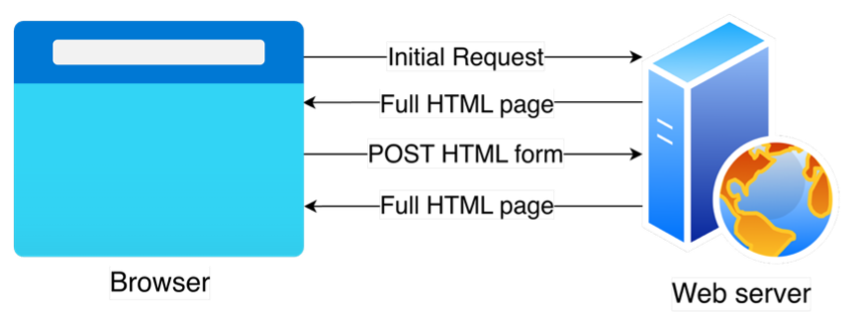
MPAs are the way the web was originally conceived to work. The user instructs the browser to retrieve a particular page from the server by using the hypermedia controls (links and forms) contained in the current page, or by navigating straight to it using its unique URL. After each interaction, a full HTML page is sent from the server to the browser, that then renders it to the user, replacing the current one.
SPAs use a different paradigm. Instead of having the server sending the HTML content to the browser, a JavaScript application is first downloaded when the user navigates to the landing URL of an application (e.g. www.jisc.ac.uk). From that point on, the application runs on the client’s browser, fetching data from the server (typically in JSON format) and dynamically updating the HTML code of the current visible page. That is, instead of retrieving full HTML pages from the server, there is only one page representing the entire web application, that gets dynamically modified based on data received from the server.
The state (what the user sees at a given time) lives therefore on the client, as the server does not know how the data it is sending is being rendered by the application. The main selling point of SPAs is a significantly improved user experience. Instead of getting a full page reload every time a user interacts with the application, the content dynamically changes in discrete updates in a way that’s more similar to what a native application would do (e.g. a dialog shows up to add a new item to a list, and when the user submits the data, the table shows the new element immediately). This provides a much smoother experience.
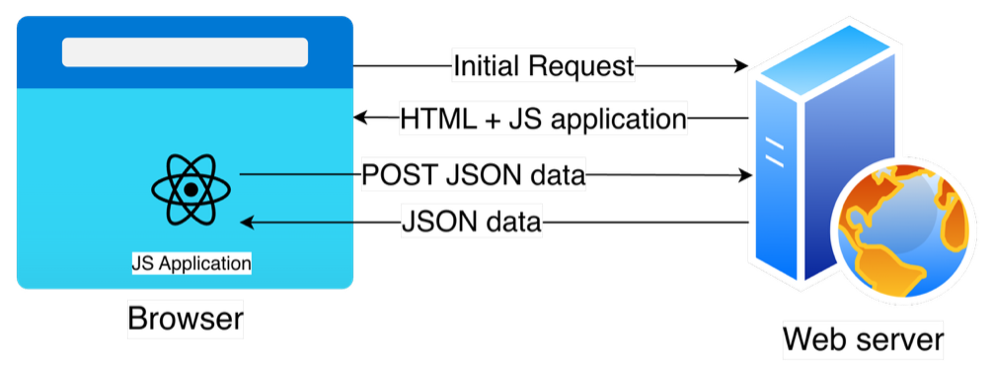
However, these benefits do not come without trade–offs. SPAs require splitting the application into two distinct parts. The backend, which runs on the server, talks to the database and makes the data available in the form of a JSON API (Application Programming Interface). The frontend runs on the client’s browser and reads from this API to render the single page the user interacts with.
These two parts are usually written using different frameworks, and quite often even languages (e.g. Java Spring Boot backend, and React frontend) and typically require a much bigger team that has specialists on each one of these. These two also often need to duplicate functionality. For example, the backend needs to validate the data coming from the frontend before saving it (e.g. does that look like a valid phone number?), but this validation should also be run on the frontend to offer a better experience (e.g. the user gets an error message displayed as soon as they start typing letters on a phone number field).
Therefore, while changes in the business logic always need to be translated consistently to both backend and frontend, and it’s a cause of problems when they get out of sync, this is especially true for an SPA Another common problem with these SPAs is the addition of a network layer (the JSON API). This introduces another point of failure into the mix. What happens if the network fails in the middle of a transaction? Sometimes, the frontend (which runs locally) seems to be working, but the backend is not, and it might not be obvious to the user about what is happening.
Another aspect where MPAs outdo SPAs is caching. While you can cache the JSON data an SPA gets from the server, it still needs to render the page based on that data, which can use a lot of processing power on the browser, especially noticeable on mobile and low-power devices. However, MPAs can cache the final rendered page, resulting in blazing fast response times when used properly, especially on sites where data does not change often.
In summary, SPAs are more complex and have more moving parts than MPAs, making designing, implementing and debugging applications much harder. Besides, there is no directly addressable URL on the server for a particular state. On the bright side, they offer the “best possible” user experience. Conversely, MPAs offer a much simpler
architecture, where each user interaction has an associated endpoint or URL on the server, providing back a full HTML page. The downside is that user experience is often not as good, resulting in clunkier navigation.
Do we really need an SPA for every application?
While getting the “best usability” sounds like an appealing argument that most product owners will buy without blinking, the reality is that most applications that are written nowadays as SPAs could be written as MPAs without sacrificing much functionality. Floating labels, vanishing toasts, dynamic updates in tables, simultaneous editing, … they are all nice to have, but often not a real requirement for the functionality of the application. Therefore, defaulting into developing SPAs might not be the right choice.
Clearly, applications that require highly dynamic content updates (spreadsheets, chat rooms, design tools such as Figma, etc.) are greatly benefited from following the SPA model. Also applications that need to make themselves distinct and attractive to as many users as possible might want to get this enhanced user experience. But most small applications out there typically only need to allow users to access data and submit updates.
Then, why have SPAs turned out so popular and even become the default approach? One reason might be that new developers are trained to build SPAs by default, without even understanding there are other approaches. But in my opinion, the main reason is the clunkier navigation experience that MPAs offer by default, especially when users are so used of the smoothness of services like Google Applications, social media, etc.
But does this really justify baking in the inherent complexity of SPAs?
Middleground approach: AJAX
What if we could incorporate some of the benefits of SPAs (i.e. a smoother navigation experience) into MPAs without adding the complexity?
In 1999, AJAX was defined as a way to allow retrieving data asynchronously from the server. Soon developers started applying this concept to retrieve partial HTML documents from the server and use them to replace parts of the current page. It was the predecessor of SPAs and was quickly embraced by companies like Google that started using it for its Gmail and Google Maps services. While AJAX does not offer all the interactivity possibilities that modern JS frameworks do, it can overcome the main drawbacks of MPAs without giving up on using a server-rendered approach or having to decide on using a full JavaScript framework. Unlike SPAs, with AJAX you are still leveraging the server to provide the HTML code, and the browser limits itself to just render it without implementing any further business logic.
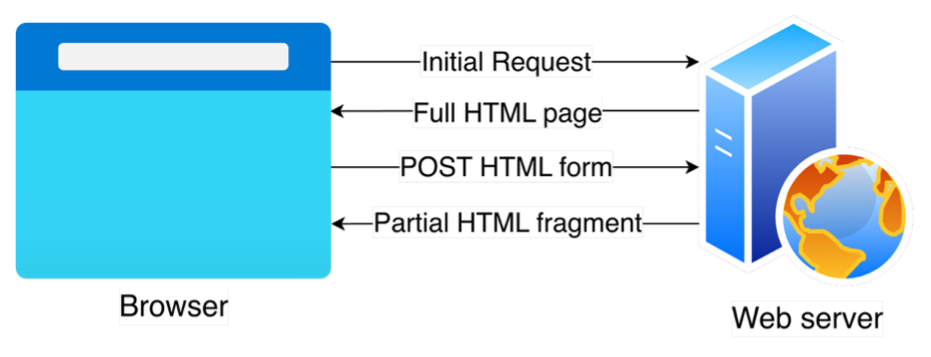
However, performing AJAX calls still requires writing JavaScript code in your application. This code (behaviour) is often defined in a separate part of your application, away from the definition of the triggering element (e.g. the button). This follows the so-called Location of Concerns. This still makes writing, reading and understanding this code more complex than it could be.
HTMX, the declarative AJAX library
In 2013 a developer called Carson Gross was fed up with the amount of JavaScript code he had to write for even the most simple of the interactions when using the SPA frameworks available, and decided to create a library called intercooler.js (later renamed into HTMX) that allows using AJAX, but without having to write a single line of JavaScript. Instead, by adding new HTML attributes to the triggering elements, developers could define the behaviour they wanted right where it was needed (Locality of Behaviour).
For example, if we have an “Add to basket” button on our current page and we want that, on click, the item is added to the chart and the badge on the top-right corner of the page updates to reflect that, you would have something like this:
<button hx-trigger="click"
        hx-post="/add-item/"
        name="item_id"
        value="45"
        hx-target="#basket-icon">
        Add item to basket
</button>
<div id="basket-icon">
   You have 2 items in your basket
</div>
This reads as: When the user clicks on the button, submit this data (item_id=45) to the server, and replace the basket icon (identified as “basket-icon”) with whatever HTML code the server generates as a result.
An example HTML response from the server would be:
<div id=”basket-icon”>
   You have 3 items in your basket
</div>
Because HTMX is a library and not a framework, and it has a very reduced scope (just allowing using a declarative language to define AJAX interactions), it is very small in size (approximately 16 kilobytes), does not have any dependencies, and can be used by just adding a single line to your HTML code, without the complex building processes SPA frameworks require.
How we build applications in Jisc’s Trust and Identity Group (T&I)
In T&I we had opted to build our applications using the MPA approach, as the most important thing for us is reliability, simplicity, and development speed. We can afford having an extra page refresh, or a clunkier user experience, but not failing in production because complexity grew so much that is not manageable anymore.
However, despite our applications not needing to be SPAs, there was a particular pain point that shown particularly bad user experience and was affecting productivity. Whenever a user wanted to add, edit or remove an element, our applications would take them to a completely different page with a form. On submission, the user would be redirected back to the origin page, where they could see the updated view.
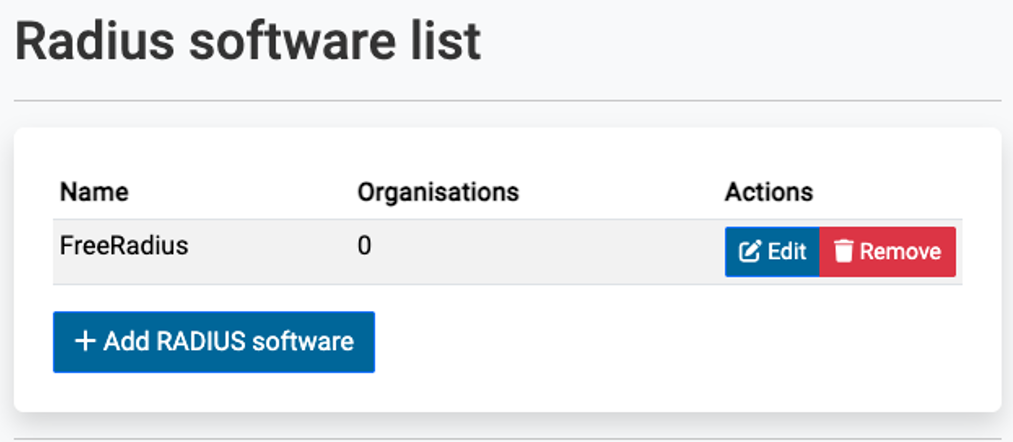
By using HTMX to perform partial page updates we are now able to dynamically render the form in a dialog that opens when the user clicks on the action button. On form submission, the server would return only the content corresponding to the parts of the page that are meant to be updated. That is, if there are errors, the form is updated to highlight them. If the submission is successful, the table of elements is updated showing the new element added (in the case of an addition). For all these interactions, as the page is not fully re-rendered so, the navigation feels smoother. Much like it would be with an SPA, but where the server is still the holder of state and responsible for the generation of all the HTML code. This also makes our teams more productive by allowing them to retain their context.
The following example describes an example dynamic dialog interaction for the addition of an element to a table:
- User navigates to a page, which is fully rendered by the browser.
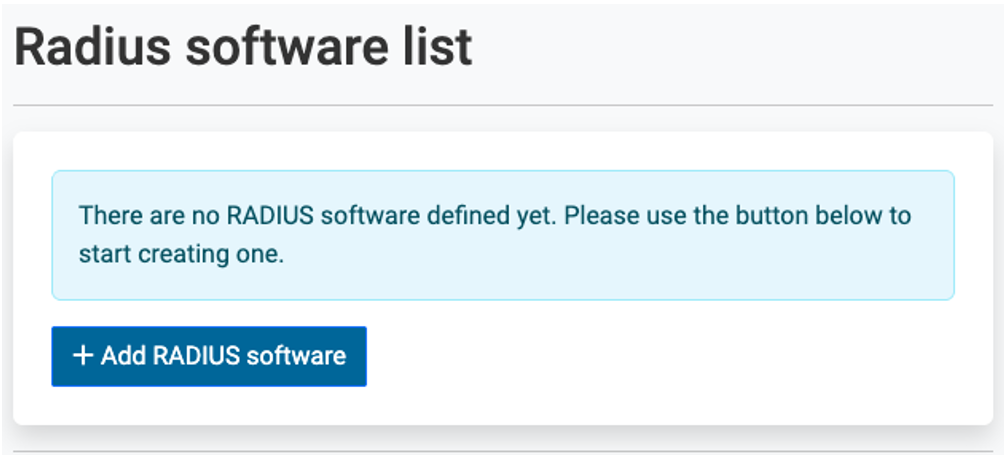
2. The user clicks on the Add button, which triggers the browser retrieve the content of the dialog from the server dynamically. Only that part of the page is updated.
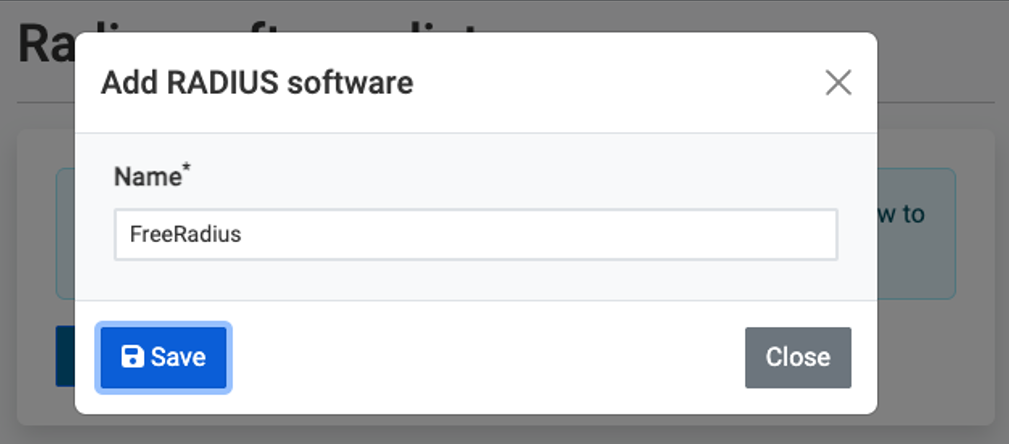
3. The user introduces the data in the form and clicks Save. That triggers the browser to retrive the content of the updated table from the server. Only the table is updated.
In addition to this, for our small team, not having to learn and master a JavaScript framework and all the tooling that is required means that we can stay focused on one technology (Django) as the main framework we use. In the situations where we need some in-page dynamic content (e.g. for multiselects, dropdowns, and dialogs), we use AlpineJS, Bootstrap, or even vanilla JS, if the task is simple enough, but we do not need to use a heavy complex framework just for it.
Is MPA + HTMX the right solution for all problems?
Not at all! HTMX has shown to be very good for the use cases that we have had so far in T&I, allowing us to build faster without compromising reliability and without the churn of having to learn and introduce heavy SPA frameworks in our workflow. But every team and every project require its own dedicated and conscious thinking and planning. Not every tool is a hammer, and not every problem is a nail. HTMX happens to shine particularly well in the type of applications T&I team builds:
- Internal business applications, where prettiness is not a main goal, still need a good user experience.
- Admin dashboards, with mostly periodic read-only updates, where portions of the page are re-rendered independently every few seconds without needing a full-page refresh.
- CRUD-heavy workflows. Most of our application workflows consist of creating, reading, updating or deleting data from a database. Having shiny widgets and ultra-smooth transitions is not needed for them. The key requirement is reliability. By using HTMX to provide dynamic modal forms, we significantly improve usability with only a few extra lines of code.
- Projects maintained by small teams or solo developers. We are a small team. We cannot afford having dedicated teams for frontend and backend. With HTMX we can now build more usable apps without the added complexity.
Summary
Within the Jisc’s Trust and Identity Group we have developed our web applications following the MPA paradigm, seeking for faster developing times, simpler architecture, and more reliable outcome. However, the user experience was not great, resulting in clunkier navigation and interactions. With the help of a library called HTMX we have been able to add features typically reserved for SPAs, such as partial updates of the current page, without having to change much of our code base or the technologies we use.
